Build Games
At Light Speed
A powerful 2D game engine with an integrated visual editor, TypeScript & RedPrint visual scripting, GPU-driven VFX, a built-in UI engine, and native + web export — all in one app.
Everything You Need to
Ship Your Game
A complete game development environment — from visual editing to multi-platform builds.
GPU Rendering
WebGPU-powered renderer that adapts to Vulkan, Metal, or DirectX 12. Sprite batching and instancing, HDR pipeline, 2D lights with soft shadows, and a cinematic post-processing stack with 20+ effects.
Integrated Editor
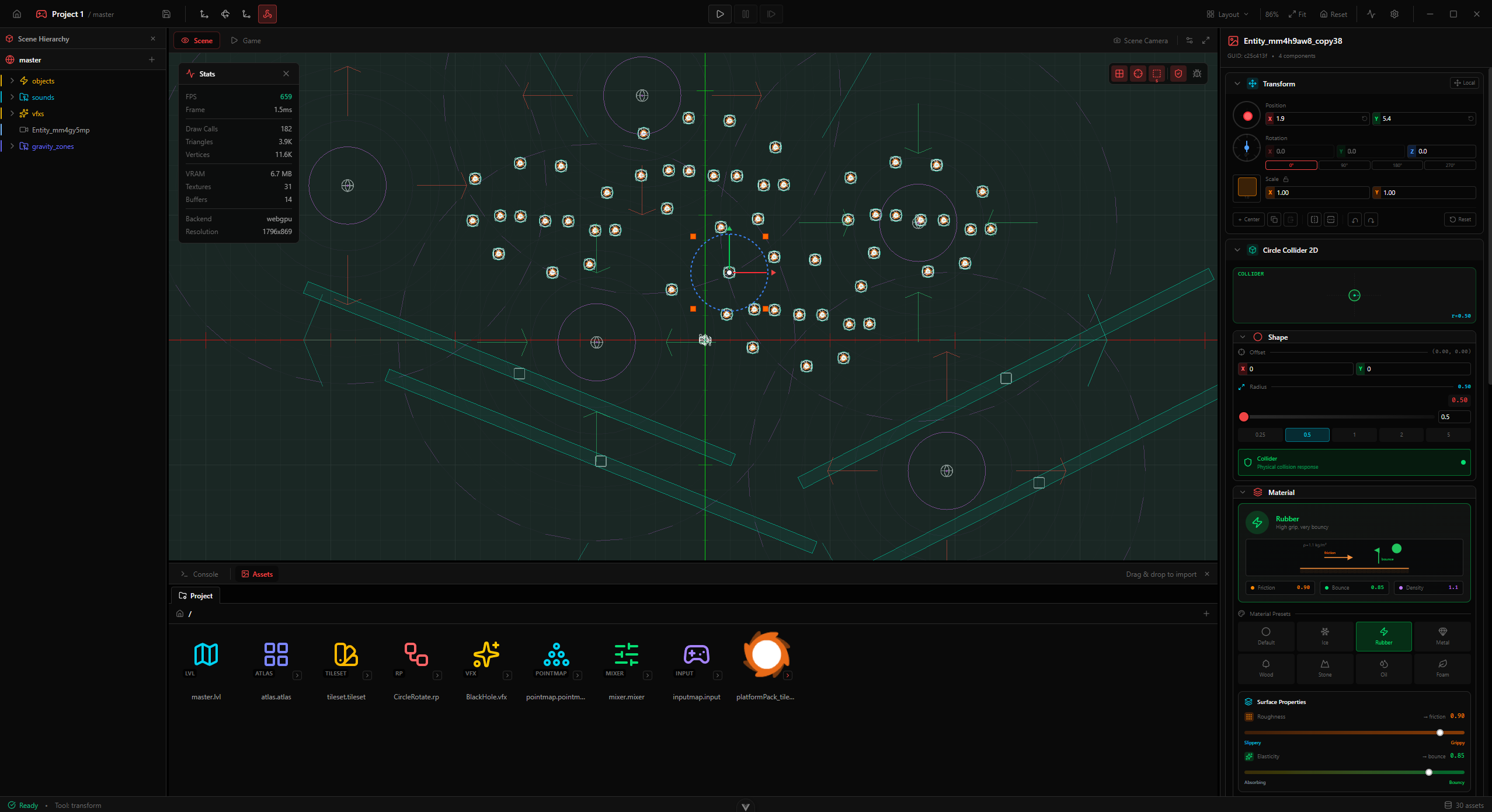
An all-in-one scene editor with hierarchy, inspector, asset explorer, viewport tools, transform gizmos, snap settings, tilemap painting, sprite animation editor, and camera rig.
TypeScript Scripting
Write game logic in TypeScript with hot reload, full type checking, and IntelliSense in the embedded code editor. Type errors are caught before play mode even starts.
RedPrint Visual Scripting
A graph-based visual scripting system inspired by Unreal Blueprints. Create game logic by connecting nodes — no coding required. Compiles for production performance.
GPU VFX Graph
Node-based particle effects with context blocks — Spawn, Initialize, Update, Output, Collision, and GPU Events. A Slang-powered compiler turns your graph into GPU simulation code for massive particle counts.
Dual Physics Engines
Built-in engine or SIMD-accelerated deterministic engine. 6 collider types, gravity/buoyancy/wind zones, one-way platforms, raycasting, CCD, collision layers — with joints, motors, and soft bodies on the roadmap.
Built-in UI Engine
Declarative UI components with flexbox layout and CSS-like styling — transitions, keyframes, rounded clipping, acrylic blur, and shader materials on any element. Rendered natively by the engine.
MSDF Text Rendering
Crisp text at any zoom with multi-channel SDF glyphs. Variable font weights, kerning, ligatures, full Unicode including Cyrillic, SDF icons — and shader materials applied straight to glyphs.
Materials & Slang Shaders
Author shaders in Slang. Materials support variants, per-entity property overrides, and instancing — validated headlessly at build time and precompiled to SPIR-V for native builds.
Spatial Audio
Full-featured audio engine with spatial sound, HRTF panning, bus routing, mixer editor, per-source filters, and detailed inspector controls for every parameter.
Content Pipeline
Native Aseprite import, image format conversion, automatic thumbnails, drag-and-drop assets. Supports PNG, WebP, TGA, QOI, DDS, and more out of the box.
Multi-Platform Deploy
Build to HTML5, native Windows desktop (AOT-compiled with precompiled shaders), or Argon PlayFrame. macOS and Linux are coming next; mobile and consoles are on the roadmap.
A Complete Game Studio
On Your Desktop
The integrated editor gives you everything — scene hierarchy, property inspector, asset explorer, viewport with transform gizmos, tilemap painting, play/pause/step controls, sprite animation editor, and a built-in performance profiler. All in one window.
Cinematic Camera
Rig
A full camera orchestration system inspired by industry-standard tools. Priority blending between rigs, screen-space composition with dead & soft zones, spline dollies, orbital cameras, and procedural shake — all tunable in one inspector.
Game Logic
Without Code
RedPrint is a graph-based visual scripting system inspired by Unreal Blueprints. Drag, connect, and run — prototype instantly or ship to production with compiled scripts for maximum performance.
GPU-Powered
Particle Effects
Author complex particle systems visually with the node-based VFX Graph. Entirely GPU-driven — a Slang-powered compiler turns your graph into simulation shaders, so massive particle counts run without CPU overhead. Connect context blocks to create stunning effects without writing shader code.
Rate, burst, conditional emitting
Position, velocity, color, lifetime
Forces, turbulence, attraction
Sprites, trails, mesh particles
GPU particle–world collision detection
Spawn sub-effects on death, collision, or custom triggers
Cinematic Quality
In 2D
A full post-processing pipeline with 20+ effects rarely found in 2D engines. Bloom, god rays, chromatic aberration, color grading, CRT, glitch, heat haze — all running on the GPU with HDR color. Each effect has a specialized interactive editor with live preview.
Dual Physics
Engines
A reliable built-in engine and a SIMD-accelerated deterministic engine. 6 collider types, effector zones, collision layers, raycasting — and joints + soft bodies on the roadmap. Every collider gets its own visual inspector with shape preview, material editor, and platform settings.
Axis-aligned box with half-extents
Perfect circle with radius
Rounded ends, vertical or horizontal
Convex hull, up to 8 vertices
Edge chains for tilemap boundaries
Composite collider from tile data
Objects pass through from the opposite side, but collide from the solid side.
Gravity Zones
Override, additive, point, or scale gravity. Linear / inverse-square / smoothstep falloff, priority layers.
Buoyancy Zones
Fluid density, linear & angular drag, flow velocity, surface normal. Simulates water, lava, etc.
Wind Zones
Directional or radial wind. Turbulence, pulse, strength falloff. Circle or box shape.
Rigid Body Features
- Static / Kinematic / Dynamic bodies
- Mass, linear & angular damping
- Per-body gravity scale
- Freeze X / Y / rotation constraints
- CCD (continuous collision detection)
- Dominance priority (-127 to 127)
- Sleep thresholds & interpolation
- One-way platforms with custom direction
Spatial Queries
Collision System
Joints (coming in 1.x)
Hinge — free rotation around an anchor point
Slider — free translation along one axis
Damped spring with rest length, stiffness, damping
Maximum distance constraint between two bodies
Locks relative position and rotation completely
Full motor & limit control on Revolute and Prismatic joints. All joints support anchors, wake-on-create, and contact toggling.
Soft Body Physics
Mass–Spring systems, Metaballs, and deformable bodies — a toolkit for slime, jelly, cloth, fluids, and everything that squishes.
Spatial Audio
Built In
A complete audio engine with HRTF spatial positioning, hierarchical bus routing, real-time biquad filters, and priority-driven voice management. Every source gets a dedicated inspector with waveform preview, spatial visualization, and fade envelope.
8 Biquad Filter Types
Spatial Audio
Full 3D audio positioning mapped to your 2D world. HRTF and equal-power panning, distance curves, cone attenuation, and Doppler.
Bus Mixer
Hierarchical audio bus tree — Master, Music, SFX, UI, Ambient. Volume in dB, mute/solo, aux sends between buses.
Per-Bus Filters
Chain biquad filters on any bus: lowpass, highpass, bandpass, lowshelf, highshelf, peaking, notch, allpass.
Voice Management
Up to 64 concurrent voices with priority-based stealing. Per-voice volume, pitch, loop, fade, and spatial overrides.
Real-Time Metering
Peak and RMS levels in real time. Visual waveform preview and level meters baked into the editor.
Distance Models
Linear, inverse, and exponential rolloff. refDistance, maxDistance, rolloffFactor per audio source.
Physics Materials
With Presets
Define friction, bounciness, and density for every surface — or pick from 8 built-in presets. Visual inspector with animated preview.
Default
1 kg/m²Standard physics material
Ice
0.92 kg/m²Extremely slippery frozen surface
Rubber
1.1 kg/m²High grip, very bouncy
Metal
7.8 kg/m²Heavy steel, slight bounce
Wood
0.6 kg/m²Natural wood surface
Stone
2.5 kg/m²Rough stone or concrete
Oil
0.9 kg/m²Slick oily surface
Foam
0.1 kg/m²Soft foam, absorbs impact
Visual Editor
Roughness and elasticity sliders with a live animated bouncing-ball preview showing friction and restitution in real time.
Combine Modes
Control how material properties combine on collision: Average, Minimum, Maximum, Multiply. Separate rules for friction and bounciness.
Density Types
Quick-pick densities: Air, Foam, Wood, Water, Stone, Iron. Fine-tune with a logarithmic slider from 0.1 to 100 kg/m².
Game UI That
Gotta Go Fast
A retained-mode UI built on the same GPU renderer as the rest of the engine — rounded-rect SDFs, MSDF text, gradients, 9-slice, acrylic backdrop blur and custom .slang UI materials, all batched. You style it with redcss: a genuine CSS engine — a real cascade, real specificity, real at-rules — not a lookalike property bag.
redcss is the whole CSS front end — a real tokenizer, selectors, the cascade, 142 property mappers, calc() and @keyframes. One parser serves the editor and every shipped player, so a declaration cannot mean two different things depending on where it runs.
True (a,b,c,d) specificity, @layer, !important as a cascade layer, inherit / initial / unset / revert, custom properties resolved at their own cascade position, and CSS Nesting flattened at parse time.
Stylesheets compile at import time and get baked into the shipped bundle. The player loads a resolved blob — it never tokenizes CSS to draw a frame. A syntax error is an authoring diagnostic with line and column, not a hitch.
.uix screens and .uic components with v-if / v-for / v-model / slots / <Teleport>. No DOM — templates use engine primitives, layout is flexbox, text comes from baked font atlases, and the whole tree batches down to a handful of draw calls.
Which CSS standard?
CSS has no version number any more — it is a set of independently levelled modules. These are the ones @engine/ui implements, in whole or in part:
No Grid, no floats, no tables, no pseudo-elements, no :has() — and each one is refused by name, with the blocker spelled out, instead of failing like a typo.
Measured, not claimed
The parser is graded against a pinned corpus of five stylesheets people actually ship — Bootstrap 5.3.3, Pico 2, Tailwind v4 preflight, Open Props 1.7.7 and modern-normalize.
Native Asset
Import
Drop in your Aseprite files, TGA, QOI, or DDS textures — the pipeline handles decoding, conversion, mipmaps, and thumbnails automatically.
Aseprite
.ase / .asepriteNative import — RGBA, Grayscale, Indexed color modes, layer blending, frame composition, palettes.
TGA
.tgaTarga image decoding with full alpha support.
QOI
.qoi"Quite OK Image" — lossless, RGB/RGBA, sRGB and linear colorspace.
DDS
.ddsBC1 (DXT1), BC3 (DXT5), BC7 GPU-compressed textures — decoded to RGBA for preview.
Standard Formats
Channel Swizzling
Per-Asset Settings
Format (PNG/WebP), quality, filter mode (nearest/linear), mipmaps, max size, premultiply alpha — saved per import.
Any Device,
One Unified API
A hardware-agnostic input framework inspired by Unity Input System — with action maps, composites, processor pipelines, and built-in templates for common genres.
Supported Devices
Action Types
Button — Boolean press state — any binding triggers the action Value — Single-axis float [-1..1] — highest magnitude wins Axis2D — Vec2 output — WASD composite with diagonal normalization Axis3D — Vec3 output — sensor data, 3D spatial controls Architecture
Group devices into schemes (Keyboard+Mouse, Gamepad, Touch). Auto-switches on device connect/disconnect. Filters active bindings per scheme.
Logical groups of actions — Gameplay, UI, Vehicle. Enable/disable as a group. Frame-aware lifecycle with time-based interaction re-evaluation.
Combine buttons into axes — WASD or arrows into Axis2D with automatic diagonal normalization. Positive/negative parts for 1D axes.
InputReceiver component with priority, exclusive mode for modal UI, and player index for local multiplayer (up to 8 players).
Processor Pipeline
(per-binding or per-action)Chain multiple processors per binding — e.g., Stick Deadzone → Scale → Clamp. Extensible registry for custom processors.
Interaction Types
Press Press-only, release-only, or press-and-release behavior Hold Fires after held for a duration — with progress callback Tap Quick press-and-release within a time window Multi-Tap N quick taps with configurable delay and timing Slow Tap Fires on release if held between min and max duration Action phases: Disabled → Waiting → Started → Performed → Canceled. Subscribe with onStarted / onPerformed / onCanceled callbacks.
Built-in Genre Templates
— start with a preset and customizeMove (WASD + Stick + D-Pad), Jump, Attack, Dodge
Move, Look, Fire, Aim, Jump, Crouch, Reload, Interact
Move, Aim (mouse + stick), Fire, Dash
Navigate, Submit, Cancel, Point, Click + Touch scheme
Know Where
Every ms Goes
A dedicated profiler window tracking CPU, GPU, physics, audio, and memory — with a flame graph and trace export.
Overview
Rendering, physics, audio, and memory at a glance — with frame breakdown and budget status.
CPU
Hierarchical timing table with last/avg/max values, percentages, and sparkline history per section.
GPU / Render
Draw calls, triangles, vertices, texture binds, pipeline changes, buffer uploads, and VFX particle counts.
Memory
Heap and VRAM tracking — used/allocated/limit. GPU resource counts for textures, buffers, and render targets.
Physics
Bodies, active/sleeping, colliders. Broad-phase pairs, narrow-phase contacts, islands, step time budget.
Flame Graph
Per-frame flame graph + call tree. Click any frame in the timeline to drill into nested scopes.
Tracked Metrics
Scope markers API
Build Once,
Ship Everywhere
HTML5
Deploy to the web. Any browser, any device.
AvailableWindows
Native AOT builds with precompiled shaders. No browser runtime.
AvailableArgon PlayFrame
Embedded games for Argon Chat platform.
AvailablemacOS & Linux
Native desktop builds for Mac and Linux.
Coming in 1.xMobile
iOS & Android targets.
PlannedConsoles
PlayStation, Xbox, Nintendo Switch.
Planned
Engineered for
Performance
Purpose-built from the ground up — every subsystem designed for speed and reliability.
WebGPU: Vulkan / Metal / DX12
RenderingCompiled to WGSL & SPIR-V
RenderingGPU post-processing & VFX
RenderingHDR color, tonemapping, 2D lights
RenderingCrisp glyphs, kerning, ligatures
RenderingTyped scripting with hot reload
ScriptingVisual scripting + IR compiler
ScriptingPlay mode gated on type errors
ScriptingReliable simulation engine
PhysicsHigh-perf engine with SIMD
PhysicsHRTF panning, bus routing
AudioFlexbox + CSS-like styling
UIAseprite, PNG, TGA, QOI, DDS
AssetsEditor tools exposed over MCP
ToolingHTML5, Windows, Embedded
Deploy20+ Post-Processing Effects
A full cinematic post-processing pipeline — unusual for a 2D engine.
Simple &
Creator-Friendly
Free during Early Access. No royalties on versions 0.x and 1.x.
No royalties. No strings attached.
Starting from version 2.x, we plan to introduce tiered pricing:
Individual
Revenue under $300k/year
Full engine access, all features included.
Pro
Revenue under $1M/year
Priority support, advanced features.
Enterprise
Revenue over $1M/year
Source code access, dedicated support.
Where We're
Headed
A transparent look at what's done, what's next, and what's coming.
- Core editor & scene system
- GPU rendering pipeline (WebGPU + Slang shaders)
- TypeScript scripting (hot reload + type checking)
- RedPrint visual scripting
- Built-in UI engine (flexbox + CSS-like styling)
- MSDF text rendering (weights, kerning, ligatures)
- Sprite animation & tilemap toolkit
- GPU VFX Graph + Slang VFX compiler
- Dual physics engines (deterministic + SIMD)
- Post-processing pipeline (20+ effects)
- HDR rendering
- 2D lighting, soft shadows & volumetrics
- Spatial audio system
- Camera rig & cinematics
- HTML5, Windows & Argon PlayFrame targets
- MCP support for editor tooling
- Built-in profiler (real GPU timings)
- macOS & Linux desktop targets
- Animation state machines & blend trees
- Timeline sequencer & cutscenes
- Physics joints (Revolute, Prismatic, Spring, Rope, Fixed)
- Joint motors & limits
- Destructible geometry
- Multiplayer / networking
- Skeletal animation system
- Inverse Kinematics (IK) solver
- Procedural animation (gait, leg placement)
- Plugin system
- Improved documentation & tutorials
- Shader Graph
- Soft body physics (Mass–Spring, Metaballs)
- 3D rendering support
- Mobile build targets
- Console build targets
- Tiered pricing model
- Enterprise source access
Frequently Asked
Questions
Is Red Pew Engine free?
Yes — completely free during Early Access (versions 0.x and 1.x) with no royalties. Starting from 2.x, we plan to introduce tiered pricing with a free Individual tier for studios earning under $300k/year.
Is it open source?
No. Red Pew Engine is closed-source proprietary software developed by Argon Inc. LLC. Source code access may be available under an Enterprise license in the future.
What platforms can I build for?
Today you can ship to HTML5 (any modern browser), native Windows desktop (AOT-compiled, no browser runtime), and Argon PlayFrame (embedded games). macOS and Linux desktop builds are coming in 1.x; mobile and console targets are planned for 2.x.
Do I need programming experience?
Not necessarily! RedPrint visual scripting lets you create game logic by connecting nodes — no coding required. When you want code, the engine uses TypeScript — with hot reload, full type checking, and IntelliSense in the built-in code editor.
What makes it different from Unity or Godot?
Red Pew is purpose-built for 2D from the ground up — not a 3D engine with a 2D mode. It features GPU-driven VFX, an HDR pipeline with 20+ cinematic post effects, 2D lighting with soft shadows, dual physics engines, a built-in UI engine with MSDF text, and spatial audio — all shipping as a single native app.
What rendering backend does it use?
The renderer is built on WebGPU and automatically targets Vulkan, DirectX 12, or Metal. Shaders are written in Slang and validated at build time; native Windows builds ship precompiled SPIR-V for fast startup, while web builds use WebGPU directly.
Does it work with AI coding tools?
The editor supports the Model Context Protocol (MCP), so MCP-capable assistants can be connected to it if you want — it's entirely optional.
How do I get it?
Red Pew Engine is distributed through Steam. Search for "Red Pew Engine" on Steam or click "Get on Steam" at the top of this page. It's free during Early Access.
Can I use it for commercial games?
Absolutely. There are no revenue limits or royalties during Early Access. Build and sell your games with full confidence.
Ready to Build
Your Next Game?
Red Pew Engine is available on Steam. Free during Early Access — no royalties on versions 0.x and 1.x.
Available on Windows, macOS, and Linux via Steam.